Going round in circles
Moving in a straight line needs only adding. Moving in a circle needs a little trigonometry, and the math module has the functions for it.
A point on a circle is given by its angle. math.cos and math.sin take the angle in radians, in which a full circle is 2π, about 6.28 (math.pi is π). For a circle with its center at (cx, cy) and radius r, the point at the angle a is
x = cx + math.cos(a) * r
y = cy + math.sin(a) * r
At the angle 0 the point is straight to the right of the center, since the cosine of 0 is 1 and its sine is 0. A quarter of a circle later, at π / 2, the cosine is 0 and the sine is 1:
>>> import math
>>> math.cos(0), math.sin(0)
(1.0, 0.0)
>>> round(math.cos(math.pi / 2), 2), round(math.sin(math.pi / 2), 2)
(0.0, 1.0)
>>> round(2 * math.pi, 2)
6.28
In pygame y grows downward, so the point at π / 2 is below the center: as the angle grows, the point goes round clockwise.
Round and round
To go round, add a little to the angle on every frame:

robot.png, 40 × 40 pixelsimport math
import pygame
pygame.init()
window = pygame.display.set_mode((320, 240))
robot = pygame.image.load("robot.png")
angle = 0
clock = pygame.time.Clock()
while True:
for event in pygame.event.get():
if event.type == pygame.QUIT:
exit()
x = 160 + math.cos(angle) * 80 - robot.get_width() / 2
y = 120 + math.sin(angle) * 80 - robot.get_height() / 2
window.fill((0, 0, 0))
window.blit(robot, (x, y))
pygame.display.flip()
angle += 0.05
clock.tick(60)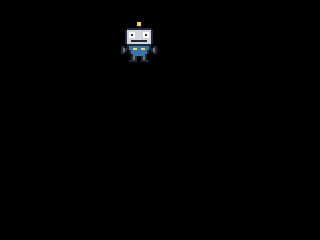
The window as text
fill (0, 0, 0)
blit robot.png at (119, 22)
The robot's center goes round the window's center (160, 120) at a distance of 80 pixels. Subtracting half of the robot's width and height moves its top-left corner so that the image is centered on the point. The angle grows by 0.05 per frame, so one round takes 6.28 / 0.05, about 126 frames: a little over two seconds at 60 frames per second. The positions are floats, and blit drops their fractions, so the window as text shows whole numbers.
Several things go round the same circle when their angles are spread evenly: for six coins, 2π / 6 apart. In each frame, coin number i is at the angle angle + i * 2 * math.pi / 6.
Turning an image
pygame.transform.rotate(image, degrees) gives a new image: the old one turned counterclockwise by that many degrees (not radians: a full circle is 360). The turned image is bigger, because its corners stick out: the robot turned by 45 degrees needs a 56 x 56 image. So to keep a spinning image in place, center it by the turned image's own size:
import pygame

pygame.init()
window = pygame.display.set_mode((320, 240))
robot = pygame.image.load("robot.png")

angle = 0
clock = pygame.time.Clock()

while True:
    for event in pygame.event.get():
        if event.type == pygame.QUIT:
            exit()

    turned = pygame.transform.rotate(robot, angle)
    x = 160 - turned.get_width() // 2
    y = 120 - turned.get_height() // 2

    window.fill((0, 0, 0))
    window.blit(turned, (x, y))
    pygame.display.flip()

    angle += 3
    clock.tick(60)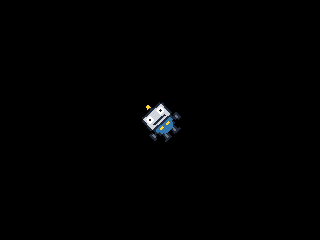
The window as text
fill (0, 0, 0)
blit robot.png rotated 42 at (132, 92)
Turn the original image by the whole angle in every frame, as here. Turning an already turned image again and again would make it bigger and blurrier each time. The window as text says what was drawn: blit robot.png rotated 42 at (132, 92).