Moving pictures
An animation is a series of pictures shown quickly one after another, each a little different from the one before, and the eye sees movement. A pygame program already has the series of pictures: the frames of its main loop. To animate something, keep its position in variables and change them a little on every round of the loop.

robot.png, 40 × 40 pixelsimport pygame
pygame.init()
window = pygame.display.set_mode((320, 240))
robot = pygame.image.load("robot.png")
x = 0
y = 100
clock = pygame.time.Clock()
while True:
for event in pygame.event.get():
if event.type == pygame.QUIT:
exit()
window.fill((0, 0, 0))
window.blit(robot, (x, y))
pygame.display.flip()
x += 2
clock.tick(60)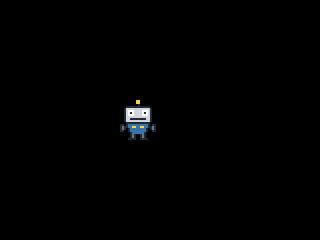
The window as text
fill (0, 0, 0)
blit robot.png at (118, 100)
The variables x and y hold the robot's position. They get their first values once, before the main loop. Every round draws the robot where it is, shows the frame, and then moves it: x += 2. So the first frame shows the robot at x = 0, the second at 2 and the third at 4: frame number n shows it at 2 × (n - 1). The window above showed 60 frames, so its last frame has the robot at x = 118:
fill (0, 0, 0)
blit robot.png at (118, 100)
Fill every frame
The fill at the start of each frame paints over the frame before. Without it, the old pictures stay in the window and the robot smears a trail behind it. Here the window is filled only once, before the main loop:
import pygame

pygame.init()
window = pygame.display.set_mode((320, 240))
robot = pygame.image.load("robot.png")

x = 0
clock = pygame.time.Clock()
window.fill((0, 0, 0))

while True:
    for event in pygame.event.get():
        if event.type == pygame.QUIT:
            exit()

    window.blit(robot, (x, 100))
    pygame.display.flip()

    x += 2
    clock.tick(60)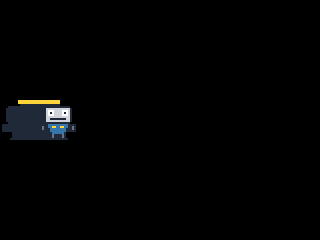
The window as text
fill (0, 0, 0)
blit robot.png at (0, 100)
blit robot.png at (2, 100)
blit robot.png at (4, 100)
blit robot.png at (6, 100)
blit robot.png at (8, 100)
blit robot.png at (10, 100)
blit robot.png at (12, 100)
blit robot.png at (14, 100)
blit robot.png at (16, 100)
blit robot.png at (18, 100)
blit robot.png at (20, 100)
blit robot.png at (22, 100)
blit robot.png at (24, 100)
blit robot.png at (26, 100)
blit robot.png at (28, 100)
blit robot.png at (30, 100)
blit robot.png at (32, 100)
blit robot.png at (34, 100)
blit robot.png at (36, 100)
blit robot.png at (38, 100)
Its window as text has a blit line for every frame, since nothing has painted over them.
The clock
clock = pygame.time.Clock() makes a clock, and clock.tick(60) at the end of each round keeps the loop from going round more than 60 times a second: when a round took less than a 60th of a second, tick waits for the rest of it. That's 60 frames per second (FPS), a common speed for games. Without the clock, the loop would run as fast as the computer can go. The robot would cross the window in a blink, and at a different speed on every computer. With the clock, the speed is easy to work out: 2 pixels per frame at 60 frames per second is 120 pixels per second.
Make the clock once, before the main loop, and call tick once in every round.
On this site the clock is counted, not waited for: tick(60) moves the program's clock on by a 60th of a second at once. So a run of 120 frames takes only a moment, and it comes out the same in every run. Play shows the frames at the program's own pace, 60 per second.