A complete small game
Here's the coin chase finished: a monster, a time limit and an end. Read it through first. The sections after it explain what's new.

robot.png, 40 × 40 pixels
coin.png, 24 × 24 pixels
monster.png, 40 × 40 pixelsimport random
import pygame
WIDTH = 480
HEIGHT = 360
GAME_TIME = 15
class CoinChase:
def __init__(self):
pygame.init()
self.window = pygame.display.set_mode((WIDTH, HEIGHT))
pygame.display.set_caption("Coin Chase")
self.robot_picture = pygame.image.load("robot.png")
self.coin_picture = pygame.image.load("coin.png")
self.monster_picture = pygame.image.load("monster.png")
self.font = pygame.font.SysFont("Arial", 24)
self.clock = pygame.time.Clock()
self.reset()
def reset(self):
self.robot_x = 40
self.robot_y = 160
self.monster_x = 420
self.monster_y = 40
self.coins = 0
self.frames = 0
self.over = False
self.place_coin()
def place_coin(self):
self.coin_x = random.randint(0, WIDTH - 24)
self.coin_y = random.randint(40, HEIGHT - 24)
def seconds_left(self):
return GAME_TIME - self.frames // 60
def run(self):
while True:
self.handle_events()
if not self.over:
self.update()
self.draw()
self.clock.tick(60)
def handle_events(self):
for event in pygame.event.get():
if event.type == pygame.QUIT:
exit()
if event.type == pygame.KEYDOWN and event.key == pygame.K_r:
self.reset()
def update(self):
self.move_robot()
self.move_monster()
robot = pygame.Rect(self.robot_x, self.robot_y, 40, 40)
coin = pygame.Rect(self.coin_x, self.coin_y, 24, 24)
monster = pygame.Rect(self.monster_x, self.monster_y, 40, 40)
if robot.colliderect(coin):
self.coins += 1
self.place_coin()
if robot.colliderect(monster):
self.over = True
self.frames += 1
if self.seconds_left() == 0:
self.over = True
def move_robot(self):
keys = pygame.key.get_pressed()
if keys[pygame.K_LEFT]:
self.robot_x -= 3
if keys[pygame.K_RIGHT]:
self.robot_x += 3
if keys[pygame.K_UP]:
self.robot_y -= 3
if keys[pygame.K_DOWN]:
self.robot_y += 3
self.robot_x = max(0, min(self.robot_x, WIDTH - 40))
self.robot_y = max(0, min(self.robot_y, HEIGHT - 40))
def move_monster(self):
if self.monster_x < self.robot_x:
self.monster_x += 1
if self.monster_x > self.robot_x:
self.monster_x -= 1
if self.monster_y < self.robot_y:
self.monster_y += 1
if self.monster_y > self.robot_y:
self.monster_y -= 1
def draw(self):
self.window.fill((30, 90, 60))
self.window.blit(self.coin_picture, (self.coin_x, self.coin_y))
self.window.blit(self.robot_picture, (self.robot_x, self.robot_y))
self.window.blit(self.monster_picture, (self.monster_x, self.monster_y))
coins_text = self.font.render(f"Coins: {self.coins}", True, (255, 255, 255))
self.window.blit(coins_text, (10, 10))
time_text = self.font.render(f"Time: {self.seconds_left()}", True, (255, 255, 255))
self.window.blit(time_text, (390, 10))
if self.over:
message = self.font.render("Game over! Press R to play again.", True, (255, 230, 120))
self.window.blit(message, (106, 172))
pygame.display.flip()
if __name__ == "__main__":
game = CoinChase()
game.run()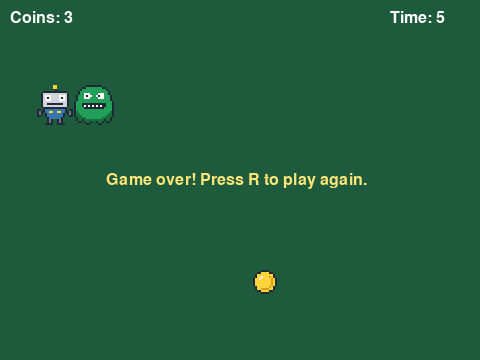
The window as text
fill (30, 90, 60)
blit coin.png at (253, 270)
blit robot.png at (35, 85)
blit monster.png at (74, 85)
blit text "Coins: 3" at (10, 10)
blit text "Time: 5" at (390, 10)
blit text "Game over! Press R to play again." at (106, 172)
The monster
move_monster moves the monster one pixel closer to the robot on each axis, on every frame:
def move_monster(self):
    if self.monster_x < self.robot_x:
        self.monster_x += 1
    if self.monster_x > self.robot_x:
        self.monster_x -= 1
    if self.monster_y < self.robot_y:
        self.monster_y += 1
    if self.monster_y > self.robot_y:
        self.monster_y -= 1
The robot moves 3 pixels a frame and the monster only 1, so a player who keeps moving can stay out of its reach. A game like this is all about such numbers. Try other speeds and see how the game changes.
Time
self.frames counts the frames that the game has run. At 60 frames a second, self.frames // 60 is the number of whole seconds played, and seconds_left subtracts it from the game's length, GAME_TIME. A constant at the top of the program makes it easy to try a shorter or a longer game.
When the game is over
The attribute self.over tells whether the game has ended. update sets it to True when the monster catches the robot or the time runs out. From then on the main loop skips update, so nothing moves, but draw keeps showing the last picture with a message on top. R calls reset, which sets everything back, self.over included.
An attribute that tells which phase a game is in, playing or over, is common in games. A bigger game could have more phases: a title screen, a pause, the next level.
Make it yours
A game grows one small change at a time. The challenges of this step make three changes to the coin chase: a faster monster, coins that give more time, and lives, so that being caught once doesn't end the game. Some more ideas, for this game or your own:
- more monsters, kept in a list, each moved by the same code
- a monster that gets faster with every five coins
- a best score that stays while the program runs, in an attribute that
resetdoesn't touch
Testing your game
Test the part you're working on without playing the whole game: start the monster right next to the robot to see the ending, or set GAME_TIME to 3. Print values while you look for a bug. Then put the real values back.
Then hand the game to someone else, and watch them play without helping. Did they know what to do without being told? Where did they get stuck, or bored? Did they want another round when it ended? That shows you what to work on next. Someone who can read code can also tell you which part of yours was hard to follow.
You can write and play a game of your own in the Playground of this site, where all its pictures are available.