Planning your own game
You've built a whole game. The last project of the course is a game of your own: your idea, written with what you've learned. This module helps you plan it, and builds a small game that you can use as a starting point.
What makes a game
Think of a small game you like. It has a goal: you know what you're trying to do, and when you've won or lost. You steer something. On the way, there are things that help you or get in the way, such as coins to pick up or monsters to dodge. And a number on the screen, such as points, time left or lives, shows how it's going. The box game had them all: a puzzle to solve, a robot to steer, boxes and walls, and the count of moves. So you already know how to write each one.
Ideas
Choose something small enough to finish. You can always add to a game that works. A few ideas:
- Coin chase: collect coins that appear in random places, while a monster follows you.
- Dodge: monsters bounce around the window, and the robot has to keep away from them. The score is how long it survives.
- Maze run: build a maze from the tiles of the box game, and find the way out in as few moves as possible, or before the time runs out.
- Keep it up: bounce a ball off a paddle at the bottom of the window, and count the bounces.
Besides the robot and the tiles of the box game, the site has these pictures for your games:

coin.png, 24 × 24 pixels
ball.png, 28 × 28 pixels
monster.png, 40 × 40 pixelsFrom an idea to a plan
Before writing any code, write down four things in plain words. For the coin chase:
- What's in the game: the robot, a coin, a monster, and the number of coins collected so far.
- What the player does: the arrow keys move the robot.
- What happens by itself: the monster moves toward the robot, and a collected coin jumps to a new place.
- How it ends: the monster catches the robot.
The plan turns into code almost by itself, with one method for each job. Point 1 is the game's state: the attributes that reset sets up. Point 2 is what the player does. A single key press, such as R to start a new game, is an event for handle_events, but keys that are held down, such as the arrow keys here, are checked in update on every frame. Points 3 and 4 go in update too: it moves the game on by one frame, and checks whether the game has ended. draw shows the state in the window.
A game that moves by itself
The box game waited for the player: between two key presses, nothing changed. In the coin chase, things move on every frame, so the main loop calls update between handling the events and drawing:
def run(self):
    while True:
        self.handle_events()
        self.update()
        self.draw()
        self.clock.tick(60)
Now the clock matters: at 60 frames a second, a robot that moves 3 pixels a frame goes 180 pixels a second. To move smoothly, the robot moves on every frame while an arrow key is held down, and as in part 13, pygame.key.get_pressed() tells which keys are down right now:
keys = pygame.key.get_pressed()
if keys[pygame.K_LEFT]:
    self.robot_x -= 3
Did they touch?
Most games ask on every frame whether two things touch: the robot and a coin, the robot and a monster. This is called collision detection, and you met pygame's tool for it in part 13: pygame.Rect and its method colliderect. The game keeps its positions as plain numbers in attributes, and makes the rectangles from them whenever it checks, so they always match the latest positions:
import pygame

robot_x, robot_y = 100, 50
coin_x, coin_y = 130, 80
robot = pygame.Rect(robot_x, robot_y, 40, 40)
coin = pygame.Rect(coin_x, coin_y, 24, 24)
print(robot.colliderect(coin))

coin_x = 140
coin = pygame.Rect(coin_x, coin_y, 24, 24)
print(robot.colliderect(coin))True
FalseThe robot covers x from 100 to 139. The coin at x = 130 overlaps it, but once the coin has moved to x = 140, their edges only touch, and that isn't an overlap.
The first version
Get a small version working first, then add one thing at a time and try the game after each one, the way the box game was built. Here's the start of the coin chase, without the monster: the robot moves with the arrow keys, and a coin waits at a random place. The robot can't pick the coin up yet, so it walks right over it. Picking it up, with the rectangles from above, is the next thing to add: that's the second challenge below. On this site, random gives the same numbers every time a window runs, so the coin is in the same place every time you play here.

robot.png, 40 × 40 pixelsimport random
import pygame
WIDTH = 480
HEIGHT = 360
class CoinChase:
def __init__(self):
pygame.init()
self.window = pygame.display.set_mode((WIDTH, HEIGHT))
pygame.display.set_caption("Coin Chase")
self.robot_picture = pygame.image.load("robot.png")
self.coin_picture = pygame.image.load("coin.png")
self.font = pygame.font.SysFont("Arial", 24)
self.clock = pygame.time.Clock()
self.reset()
def reset(self):
self.robot_x = 40
self.robot_y = 160
self.coins = 0
self.place_coin()
def place_coin(self):
self.coin_x = random.randint(0, WIDTH - 24)
self.coin_y = random.randint(40, HEIGHT - 24)
def run(self):
while True:
self.handle_events()
self.update()
self.draw()
self.clock.tick(60)
def handle_events(self):
for event in pygame.event.get():
if event.type == pygame.QUIT:
exit()
def update(self):
keys = pygame.key.get_pressed()
if keys[pygame.K_LEFT]:
self.robot_x -= 3
if keys[pygame.K_RIGHT]:
self.robot_x += 3
if keys[pygame.K_UP]:
self.robot_y -= 3
if keys[pygame.K_DOWN]:
self.robot_y += 3
def draw(self):
self.window.fill((30, 90, 60))
self.window.blit(self.coin_picture, (self.coin_x, self.coin_y))
self.window.blit(self.robot_picture, (self.robot_x, self.robot_y))
text = self.font.render(f"Coins: {self.coins}", True, (255, 255, 255))
self.window.blit(text, (10, 10))
pygame.display.flip()
if __name__ == "__main__":
game = CoinChase()
game.run()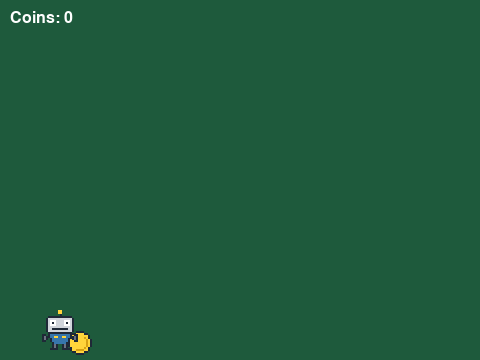
The window as text
fill (30, 90, 60)
blit coin.png at (68, 331)
blit robot.png at (40, 310)
blit text "Coins: 0" at (10, 10)