The title and shapes
A window's title bar says "pygame window" until the program gives it a name of its own with pygame.display.set_caption. Call it once, after opening the window:
pygame.display.set_caption("Coin Catcher")The page shows the title in the window's title bar. (The checks compare the drawing, not the title.)
Drawing shapes
Not everything has to be an image. The module pygame.draw draws shapes straight into the window. Each function takes the surface to draw on first and the color second:
pygame.draw.rect(window, color, (x, y, width, height))draws a rectangle with its top-left corner at (x, y).pygame.draw.circle(window, color, (x, y), radius)draws a circle with its center at (x, y). Note the difference: an image's position is its top-left corner, but a circle's is its center.pygame.draw.polygon(window, color, points)draws a shape with corners at the points of the list, such as a triangle.pygame.draw.line(window, color, start, end, width)draws a line from one point to another,widthpixels thick.
import pygame

pygame.init()
window = pygame.display.set_mode((320, 240))
pygame.display.set_caption("A house")

while True:
    for event in pygame.event.get():
        if event.type == pygame.QUIT:
            exit()

    window.fill((120, 180, 255))
    pygame.draw.rect(window, (60, 160, 60), (0, 180, 320, 60))
    pygame.draw.rect(window, (200, 120, 80), (100, 110, 100, 80))
    pygame.draw.polygon(window, (150, 40, 40), [(90, 110), (150, 60), (210, 110)])
    pygame.draw.rect(window, (90, 60, 30), (140, 150, 24, 40))
    pygame.draw.circle(window, (255, 220, 0), (270, 50), 25)
    pygame.display.flip()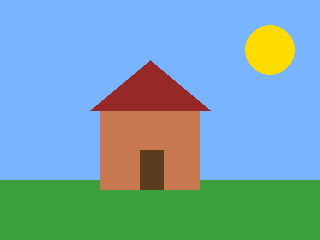
The window as text
fill (120, 180, 255)
rect (60, 160, 60) (0, 180, 320, 60)
rect (200, 120, 80) (100, 110, 100, 80)
polygon (150, 40, 40) through (90, 110), (150, 60), (210, 110)
rect (90, 60, 30) (140, 150, 24, 40)
circle (255, 220, 0) at (270, 50) radius 25
The shapes are part of the window as text, one line for each, in the order they were drawn:
fill (120, 180, 255)
rect (60, 160, 60) (0, 180, 320, 60)
rect (200, 120, 80) (100, 110, 100, 80)
polygon (150, 40, 40) through (90, 110), (150, 60), (210, 110)
rect (90, 60, 30) (140, 150, 24, 40)
circle (255, 220, 0) at (270, 50) radius 25
The order matters here as it does with images: the ground is drawn before the house, and the door after the house, so that it's in front of the wall.
Outlines and lines
A rectangle or a circle is filled by default. With one more number, the line width, you get only its outline. Here a game board of tic-tac-toe is drawn with lines and outlines:
import pygame

pygame.init()
window = pygame.display.set_mode((320, 240))
pygame.display.set_caption("Tic-tac-toe")

while True:
    for event in pygame.event.get():
        if event.type == pygame.QUIT:
            exit()

    window.fill((255, 255, 255))
    pygame.draw.line(window, (0, 0, 0), (130, 30), (130, 210), 4)
    pygame.draw.line(window, (0, 0, 0), (190, 30), (190, 210), 4)
    pygame.draw.line(window, (0, 0, 0), (70, 90), (250, 90), 4)
    pygame.draw.line(window, (0, 0, 0), (70, 150), (250, 150), 4)
    pygame.draw.circle(window, (0, 0, 220), (160, 120), 22, 5)
    pygame.draw.line(window, (220, 0, 0), (82, 42), (118, 78), 5)
    pygame.draw.line(window, (220, 0, 0), (118, 42), (82, 78), 5)
    pygame.draw.rect(window, (0, 0, 0), (60, 20, 200, 200), 2)
    pygame.display.flip()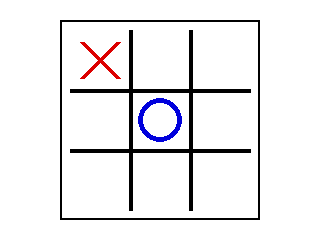
The window as text
fill (255, 255, 255)
line (0, 0, 0) from (130, 30) to (130, 210), width 4
line (0, 0, 0) from (190, 30) to (190, 210), width 4
line (0, 0, 0) from (70, 90) to (250, 90), width 4
line (0, 0, 0) from (70, 150) to (250, 150), width 4
circle (0, 0, 220) at (160, 120) radius 22, width 5
line (220, 0, 0) from (82, 42) to (118, 78), width 5
line (220, 0, 0) from (118, 42) to (82, 78), width 5
rect (0, 0, 0) (60, 20, 200, 200), width 2
Shapes move just like images: take their positions from variables and change the variables between frames. A ball can just as well be a pygame.draw.circle whose center moves.