Images and coordinates
Most of what a game shows is images. This is robot.png, one of the images on this site:

robot.png, 40 × 40 pixelspygame.image.load("robot.png") reads an image file and returns it as a surface, the same kind of object as the window: a rectangle of pixels. pygame looks for the file next to your program, so on your own computer you keep the two together. On this site, the images that an example or a challenge uses are there already. Load each image once, before the main loop: reading a file takes time, and the image stays the same.
To draw an image, you give the window's blit method the image and a point: window.blit(robot, (60, 90)) puts the robot so that its top-left corner is at (60, 90). (Blit is old graphics slang for copying a block of pixels onto another.)
import pygame

pygame.init()
window = pygame.display.set_mode((320, 240))
robot = pygame.image.load("robot.png")

while True:
    for event in pygame.event.get():
        if event.type == pygame.QUIT:
            exit()

    window.fill((0, 0, 0))
    window.blit(robot, (60, 90))
    pygame.display.flip()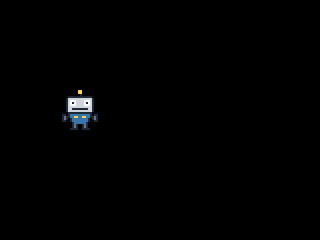
The window as text
fill (0, 0, 0)
blit robot.png at (60, 90)
As text, this window is:
fill (0, 0, 0)
blit robot.png at (60, 90)
Coordinates
A point in the window is a pair (x, y) of pixel counts, measured from the window's top-left corner, which is (0, 0). x says how far right of the left edge the point is, and y how far below the top edge: (60, 90) is 60 pixels in from the left and 90 pixels down. On a graph in math class, y grows upward, but in a window it grows downward: a bigger y is lower in the window. Most graphics libraries count this way, so you'll meet it again.
The robot is 40 by 40 pixels, so at (60, 90) it covers x from 60 to 99 and y from 90 to 129. To put it in the window's bottom-right corner, its top-left corner goes to (320 - 40, 240 - 40), which is (280, 200). At (320, 240) it would be just outside the window, and you wouldn't see it at all.
An image you've loaded can be drawn as many times as you like. Here is the robot between two coins, which are 24 by 24 pixels:

coin.png, 24 × 24 pixelsimport pygame
pygame.init()
window = pygame.display.set_mode((320, 240))
robot = pygame.image.load("robot.png")
coin = pygame.image.load("coin.png")
while True:
for event in pygame.event.get():
if event.type == pygame.QUIT:
exit()
window.fill((0, 0, 0))
window.blit(robot, (140, 100))
window.blit(coin, (80, 108))
window.blit(coin, (216, 108))
pygame.display.flip()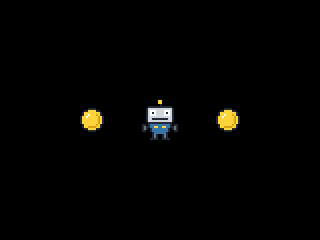
The window as text
fill (0, 0, 0)
blit robot.png at (140, 100)
blit coin.png at (80, 108)
blit coin.png at (216, 108)
Drawing order
Drawing in the window works like painting: what you draw later covers what's already there. That's why fill comes first in each frame. It paints over the previous frame, and then the images go on top. Here the fill comes last by mistake, and it paints over the robot:
import pygame

pygame.init()
window = pygame.display.set_mode((320, 240))
robot = pygame.image.load("robot.png")

while True:
    for event in pygame.event.get():
        if event.type == pygame.QUIT:
            exit()

    window.blit(robot, (60, 90))
    window.fill((0, 0, 0))
    pygame.display.flip()
The window as text
fill (0, 0, 0)
The window is all black, and its text is only fill (0, 0, 0): like the picture, the text starts over at each fill that covers the whole window. When images overlap, the one drawn last is in front. The order is part of the window as text, so the checks compare it too, and when a task has several things to draw, it says in which order.