Centering and many images
An image knows its own size: robot.get_width() and robot.get_height() give it in pixels. The window has the same methods. They're handy for placing images without typing their sizes into the program.

robot.png, 40 × 40 pixelsCentering an image
The center of a 400 x 300 window is (200, 150). To put the robot's center there, its top-left corner goes half of the robot's width to the left and half of its height up from the center. The same thing in one calculation: the space left over next to the image, divided in two.
import pygame

pygame.init()
window = pygame.display.set_mode((400, 300))
robot = pygame.image.load("robot.png")

x = (window.get_width() - robot.get_width()) // 2
y = (window.get_height() - robot.get_height()) // 2
print(x, y)

while True:
    for event in pygame.event.get():
        if event.type == pygame.QUIT:
            exit()

    window.fill((0, 0, 0))
    window.blit(robot, (x, y))
    pygame.display.flip()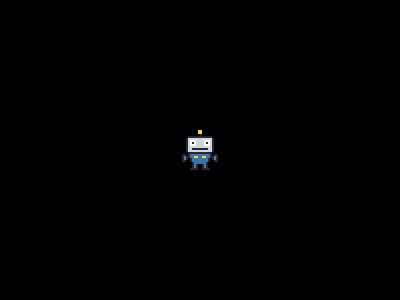
The window as text
fill (0, 0, 0)
blit robot.png at (180, 130)
180 130The program calculates the position once, before the main loop, since it never changes. With / the position would be 180.0. pygame accepts that too, but it drops the fraction, and with // you see the whole number it really uses. And if you change the window's size or the image, the robot stays in the center without any other change.
Many images with a loop
A loop draws many images with a few lines of code. This one draws a row of eight coins, one in the middle of each 40-pixel-wide column of the window:

coin.png, 24 × 24 pixelsimport pygame
pygame.init()
window = pygame.display.set_mode((320, 240))
coin = pygame.image.load("coin.png")
while True:
for event in pygame.event.get():
if event.type == pygame.QUIT:
exit()
window.fill((0, 0, 0))
for i in range(8):
window.blit(coin, (8 + i * 40, 20))
pygame.display.flip()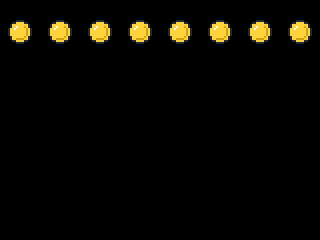
The window as text
fill (0, 0, 0)
blit coin.png at (8, 20)
blit coin.png at (48, 20)
blit coin.png at (88, 20)
blit coin.png at (128, 20)
blit coin.png at (168, 20)
blit coin.png at (208, 20)
blit coin.png at (248, 20)
blit coin.png at (288, 20)
The window as text has a line for each coin, from blit coin.png at (8, 20) to blit coin.png at (288, 20), in the order they were drawn.
Two loops, one inside the other, fill a grid. The window is 8 tiles of 40 pixels wide and 6 high, so these loops cover it with floor tiles, row by row from the top, each row from left to right:

floor.png, 40 × 40 pixelsimport pygame
pygame.init()
window = pygame.display.set_mode((320, 240))
floor = pygame.image.load("floor.png")
robot = pygame.image.load("robot.png")
while True:
for event in pygame.event.get():
if event.type == pygame.QUIT:
exit()
window.fill((0, 0, 0))
for row in range(6):
for column in range(8):
window.blit(floor, (column * 40, row * 40))
window.blit(robot, (120, 80))
pygame.display.flip()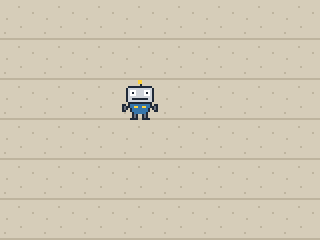
The window as text
fill (0, 0, 0)
blit floor.png at (0, 0)
blit floor.png at (40, 0)
blit floor.png at (80, 0)
blit floor.png at (120, 0)
blit floor.png at (160, 0)
blit floor.png at (200, 0)
blit floor.png at (240, 0)
blit floor.png at (280, 0)
blit floor.png at (0, 40)
blit floor.png at (40, 40)
blit floor.png at (80, 40)
blit floor.png at (120, 40)
blit floor.png at (160, 40)
blit floor.png at (200, 40)
blit floor.png at (240, 40)
blit floor.png at (280, 40)
blit floor.png at (0, 80)
blit floor.png at (40, 80)
blit floor.png at (80, 80)
blit floor.png at (120, 80)
blit floor.png at (160, 80)
blit floor.png at (200, 80)
blit floor.png at (240, 80)
blit floor.png at (280, 80)
blit floor.png at (0, 120)
blit floor.png at (40, 120)
blit floor.png at (80, 120)
blit floor.png at (120, 120)
blit floor.png at (160, 120)
blit floor.png at (200, 120)
blit floor.png at (240, 120)
blit floor.png at (280, 120)
blit floor.png at (0, 160)
blit floor.png at (40, 160)
blit floor.png at (80, 160)
blit floor.png at (120, 160)
blit floor.png at (160, 160)
blit floor.png at (200, 160)
blit floor.png at (240, 160)
blit floor.png at (280, 160)
blit floor.png at (0, 200)
blit floor.png at (40, 200)
blit floor.png at (80, 200)
blit floor.png at (120, 200)
blit floor.png at (160, 200)
blit floor.png at (200, 200)
blit floor.png at (240, 200)
blit floor.png at (280, 200)
blit robot.png at (120, 80)
Random places
To scatter coins in random places, choose the places once, before the main loop, and keep them in a list. If you chose them inside the main loop, the coins would jump to new places on every frame.
import random
import pygame

pygame.init()
window = pygame.display.set_mode((320, 240))
coin = pygame.image.load("coin.png")

places = []
for i in range(12):
    x = random.randint(0, 320 - 24)
    y = random.randint(0, 240 - 24)
    places.append((x, y))

while True:
    for event in pygame.event.get():
        if event.type == pygame.QUIT:
            exit()

    window.fill((0, 0, 0))
    for place in places:
        window.blit(coin, place)
    pygame.display.flip()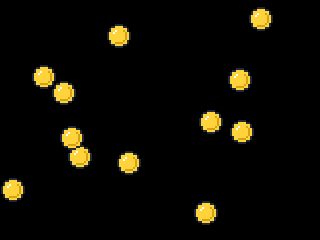
The window as text
fill (0, 0, 0)
blit coin.png at (68, 145)
blit coin.png at (32, 65)
blit coin.png at (60, 126)
blit coin.png at (230, 120)
blit coin.png at (194, 201)
blit coin.png at (107, 24)
blit coin.png at (249, 7)
blit coin.png at (199, 110)
blit coin.png at (1, 178)
blit coin.png at (228, 68)
blit coin.png at (117, 151)
blit coin.png at (52, 81)
The site starts random the same way in every run of a window, so here the coins land in the same places each time you press Play. On your own computer they'd land somewhere new in every run. That's also why no challenge here asks for random places: the checks couldn't know where your coins went.