Pushing boxes
Now the boxes. A box on the floor and a box on its target look different, so the player can see which ones are done:

box.png, 40 × 40 pixels
box-done.png, 40 × 40 pixelsA list of boxes
Like the robot, the boxes move, so they don't go in the map. The game keeps a list of their places, which reset sets up: self.boxes = [(2, 2), (6, 4)]. Whether a square has a box on it is then a question for in:
>>> boxes = [(2, 2), (6, 4)]
>>> (6, 4) in boxes
True
>>> (4, 6) in boxes
False
draw puts each box on top of its square's tile, right after drawing the tile. On a target square, it uses the picture of a finished box:
if (x, y) in self.boxes:
    if square == "X":
        self.window.blit(self.done_picture, (x * SIZE, y * SIZE))
    else:
        self.window.blit(self.box_picture, (x * SIZE, y * SIZE))
The rules of pushing
When the robot steps onto a square with a box, the box moves one square further in the same direction. That works only if the square behind the box is free: no wall and no other box. If it isn't free, nothing moves at all, not the box and not the robot. So a robot can't push two boxes in a row.
"Free" is a question the game asks often, so it gets a small method of its own:
def is_free(self, x, y):
    return self.map[y][x] != "#" and (x, y) not in self.boxes
try_move gets a new part between the wall check and the robot's move:
if (new_x, new_y) in self.boxes:
    box_x = new_x + dx
    box_y = new_y + dy
    if not self.is_free(box_x, box_y):
        return
    self.boxes.remove((new_x, new_y))
    self.boxes.append((box_x, box_y))
The box's place is a tuple, and a tuple can't be changed. So the old place is removed from the list and the new place added. Trying to change the tuple itself stops the program:
boxes = [(2, 2), (6, 4)]
box = boxes[0]
box[0] = 3Traceback (most recent call last):
File "main.py", line 3, in <module>
box[0] = 3
~~~^^^
TypeError: 'tuple' object does not support item assignmentCode that says what it means
There are other ways to store this game. One is to give every kind of square a number and keep everything in a single grid of numbers: say 7 for a wall, 2 for a box and 6 for a box that's on its target. It can be shorter, but a line like if grid[y][x] == 7: means nothing unless you remember that 7 stands for a wall. Numbers like these, whose meaning lives only in the programmer's head, are called magic numbers, and they make code hard to read and easy to break.
This game uses characters that look like what they mean, # for a wall, and attributes with names, self.robot and self.boxes, for what moves. When working code is hard to read, it's worth rewriting it to be clearer without changing what it does. That's called refactoring.
Here's the game with boxes. Besides the two box pictures, it loads the pictures from before:

floor.png, 40 × 40 pixels
wall.png, 40 × 40 pixels
target.png, 40 × 40 pixels
robot.png, 40 × 40 pixelsPush the box on the right onto the target above it:
import pygame

SIZE = 40
LEVEL = [
    "#########",
    "#...#...#",
    "#.....X.#",
    "#...#...#",
    "#..X#...#",
    "#.......#",
    "#########",
]


class BoxGame:
    def __init__(self):
        pygame.init()
        self.load_pictures()
        self.map = LEVEL
        self.height = len(self.map)
        self.width = len(self.map[0])
        self.window = pygame.display.set_mode((self.width * SIZE, self.height * SIZE))
        pygame.display.set_caption("Box Robot")
        self.clock = pygame.time.Clock()
        self.reset()

    def load_pictures(self):
        self.tiles = {
            "#": pygame.image.load("wall.png"),
            ".": pygame.image.load("floor.png"),
            "X": pygame.image.load("target.png"),
        }
        self.robot_picture = pygame.image.load("robot.png")
        self.box_picture = pygame.image.load("box.png")
        self.done_picture = pygame.image.load("box-done.png")

    def reset(self):
        self.robot = (2, 3)
        self.boxes = [(2, 2), (6, 4)]

    def run(self):
        while True:
            self.handle_events()
            self.draw()
            self.clock.tick(60)

    def handle_events(self):
        for event in pygame.event.get():
            if event.type == pygame.QUIT:
                exit()
            if event.type == pygame.KEYDOWN:
                if event.key == pygame.K_LEFT:
                    self.try_move(-1, 0)
                if event.key == pygame.K_RIGHT:
                    self.try_move(1, 0)
                if event.key == pygame.K_UP:
                    self.try_move(0, -1)
                if event.key == pygame.K_DOWN:
                    self.try_move(0, 1)

    def is_free(self, x, y):
        return self.map[y][x] != "#" and (x, y) not in self.boxes

    def try_move(self, dx, dy):
        x, y = self.robot
        new_x = x + dx
        new_y = y + dy
        if self.map[new_y][new_x] == "#":
            return
        if (new_x, new_y) in self.boxes:
            box_x = new_x + dx
            box_y = new_y + dy
            if not self.is_free(box_x, box_y):
                return
            self.boxes.remove((new_x, new_y))
            self.boxes.append((box_x, box_y))
        self.robot = (new_x, new_y)

    def draw(self):
        self.window.fill((0, 0, 0))
        for y in range(self.height):
            for x in range(self.width):
                square = self.map[y][x]
                self.window.blit(self.tiles[square], (x * SIZE, y * SIZE))
                if (x, y) in self.boxes:
                    if square == "X":
                        self.window.blit(self.done_picture, (x * SIZE, y * SIZE))
                    else:
                        self.window.blit(self.box_picture, (x * SIZE, y * SIZE))
        robot_x, robot_y = self.robot
        self.window.blit(self.robot_picture, (robot_x * SIZE, robot_y * SIZE))
        pygame.display.flip()


if __name__ == "__main__":
    game = BoxGame()
    game.run()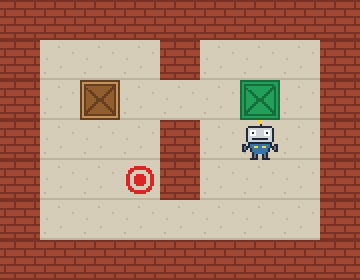
The window as text
fill (0, 0, 0)
blit wall.png at (0, 0)
blit wall.png at (40, 0)
blit wall.png at (80, 0)
blit wall.png at (120, 0)
blit wall.png at (160, 0)
blit wall.png at (200, 0)
blit wall.png at (240, 0)
blit wall.png at (280, 0)
blit wall.png at (320, 0)
blit wall.png at (0, 40)
blit floor.png at (40, 40)
blit floor.png at (80, 40)
blit floor.png at (120, 40)
blit wall.png at (160, 40)
blit floor.png at (200, 40)
blit floor.png at (240, 40)
blit floor.png at (280, 40)
blit wall.png at (320, 40)
blit wall.png at (0, 80)
blit floor.png at (40, 80)
blit floor.png at (80, 80)
blit box.png at (80, 80)
blit floor.png at (120, 80)
blit floor.png at (160, 80)
blit floor.png at (200, 80)
blit target.png at (240, 80)
blit box-done.png at (240, 80)
blit floor.png at (280, 80)
blit wall.png at (320, 80)
blit wall.png at (0, 120)
blit floor.png at (40, 120)
blit floor.png at (80, 120)
blit floor.png at (120, 120)
blit wall.png at (160, 120)
blit floor.png at (200, 120)
blit floor.png at (240, 120)
blit floor.png at (280, 120)
blit wall.png at (320, 120)
blit wall.png at (0, 160)
blit floor.png at (40, 160)
blit floor.png at (80, 160)
blit target.png at (120, 160)
blit wall.png at (160, 160)
blit floor.png at (200, 160)
blit floor.png at (240, 160)
blit floor.png at (280, 160)
blit wall.png at (320, 160)
blit wall.png at (0, 200)
blit floor.png at (40, 200)
blit floor.png at (80, 200)
blit floor.png at (120, 200)
blit floor.png at (160, 200)
blit floor.png at (200, 200)
blit floor.png at (240, 200)
blit floor.png at (280, 200)
blit wall.png at (320, 200)
blit wall.png at (0, 240)
blit wall.png at (40, 240)
blit wall.png at (80, 240)
blit wall.png at (120, 240)
blit wall.png at (160, 240)
blit wall.png at (200, 240)
blit wall.png at (240, 240)
blit wall.png at (280, 240)
blit wall.png at (320, 240)
blit robot.png at (240, 120)