Finishing the game
The puzzle can be played now, but it isn't a finished game yet. This step adds the finishing touches: a counter of moves, keys for starting over and quitting, and a message when the puzzle is solved.
A bar for text
The text goes in a bar under the map, so the window gets one row of tiles taller, and __init__ makes a font for the text:
self.window = pygame.display.set_mode((self.width * SIZE, self.height * SIZE + SIZE))
self.font = pygame.font.SysFont("Arial", 24)
Make the font once, in __init__, and not in draw: making a font takes time, and draw runs on every frame.
Counting moves
reset sets self.moves = 0, and try_move adds one at its very end, after all the checks. A bump into a wall returns before it gets there, so it isn't counted. A new method, draw_bar, writes the count and the keys in the bar:
def draw_bar(self):
    top = self.height * SIZE + 12
    text = self.font.render(f"Moves: {self.moves}", True, (255, 255, 255))
    self.window.blit(text, (10, top))
A puzzle player wants to know the count: the same puzzle can be solved in many ways, and the fewer moves, the better.
Starting over and quitting
Pushing a box into a corner ruins the game, so the player needs a way to start over. The R key calls reset, which puts the robot, the boxes and the counter back as they were at the start. The Esc key quits, just like closing the window:
if event.key == pygame.K_r:
    self.reset()
if event.key == pygame.K_ESCAPE:
    exit()
This works because reset makes a brand new list of boxes every time. If the starting places were in one list kept somewhere else, and reset said self.boxes = START_BOXES, both names would refer to the same list. Every push would change the starting places too, and R would bring back the boxes where they were last, not where they started. list(START_BOXES) would make a copy.
Solved!
The puzzle is solved when every box is on a target. A method answers the question by going through the boxes. The first box that isn't on a target settles it, so the method can return False right there. The answer is True only when the loop has checked them all:
def solved(self):
    for x, y in self.boxes:
        if self.map[y][x] != "X":
            return False
    return True
When the puzzle is solved, draw_bar shows a message instead of the count, and try_move starts with if self.solved(): return, so the robot stays still. The player can still look at the finished puzzle, and press R to play again.
Testing the ending
To test the ending, you'd have to solve the whole puzzle every time you change something. While you work on the ending, make it easy: a test level where one push solves it, or, for a moment, a solved that just says return True. Remember to put things back when the ending works.
Here's the finished game, with all six of its pictures:

floor.png, 40 × 40 pixels
wall.png, 40 × 40 pixels
target.png, 40 × 40 pixels
robot.png, 40 × 40 pixels
box.png, 40 × 40 pixels
box-done.png, 40 × 40 pixelsThe window below shows the puzzle solved in 16 moves. That's the fewest possible. Can you find another way to do it in 16?
import pygame

SIZE = 40
LEVEL = [
    "#########",
    "#...#...#",
    "#.....X.#",
    "#...#...#",
    "#..X#...#",
    "#.......#",
    "#########",
]


class BoxGame:
    def __init__(self):
        pygame.init()
        self.load_pictures()
        self.map = LEVEL
        self.height = len(self.map)
        self.width = len(self.map[0])
        self.window = pygame.display.set_mode((self.width * SIZE, self.height * SIZE + SIZE))
        pygame.display.set_caption("Box Robot")
        self.font = pygame.font.SysFont("Arial", 24)
        self.clock = pygame.time.Clock()
        self.reset()

    def load_pictures(self):
        self.tiles = {
            "#": pygame.image.load("wall.png"),
            ".": pygame.image.load("floor.png"),
            "X": pygame.image.load("target.png"),
        }
        self.robot_picture = pygame.image.load("robot.png")
        self.box_picture = pygame.image.load("box.png")
        self.done_picture = pygame.image.load("box-done.png")

    def reset(self):
        self.robot = (2, 3)
        self.boxes = [(2, 2), (6, 4)]
        self.moves = 0

    def run(self):
        while True:
            self.handle_events()
            self.draw()
            self.clock.tick(60)

    def handle_events(self):
        for event in pygame.event.get():
            if event.type == pygame.QUIT:
                exit()
            if event.type == pygame.KEYDOWN:
                if event.key == pygame.K_LEFT:
                    self.try_move(-1, 0)
                if event.key == pygame.K_RIGHT:
                    self.try_move(1, 0)
                if event.key == pygame.K_UP:
                    self.try_move(0, -1)
                if event.key == pygame.K_DOWN:
                    self.try_move(0, 1)
                if event.key == pygame.K_r:
                    self.reset()
                if event.key == pygame.K_ESCAPE:
                    exit()

    def is_free(self, x, y):
        return self.map[y][x] != "#" and (x, y) not in self.boxes

    def try_move(self, dx, dy):
        if self.solved():
            return
        x, y = self.robot
        new_x = x + dx
        new_y = y + dy
        if self.map[new_y][new_x] == "#":
            return
        if (new_x, new_y) in self.boxes:
            box_x = new_x + dx
            box_y = new_y + dy
            if not self.is_free(box_x, box_y):
                return
            self.boxes.remove((new_x, new_y))
            self.boxes.append((box_x, box_y))
        self.robot = (new_x, new_y)
        self.moves += 1

    def solved(self):
        for x, y in self.boxes:
            if self.map[y][x] != "X":
                return False
        return True

    def draw(self):
        self.window.fill((0, 0, 0))
        for y in range(self.height):
            for x in range(self.width):
                square = self.map[y][x]
                self.window.blit(self.tiles[square], (x * SIZE, y * SIZE))
                if (x, y) in self.boxes:
                    if square == "X":
                        self.window.blit(self.done_picture, (x * SIZE, y * SIZE))
                    else:
                        self.window.blit(self.box_picture, (x * SIZE, y * SIZE))
        robot_x, robot_y = self.robot
        self.window.blit(self.robot_picture, (robot_x * SIZE, robot_y * SIZE))
        self.draw_bar()
        pygame.display.flip()

    def draw_bar(self):
        top = self.height * SIZE + 12
        if self.solved():
            text = self.font.render(f"Solved in {self.moves} moves!", True, (120, 230, 120))
        else:
            text = self.font.render(f"Moves: {self.moves}", True, (255, 255, 255))
        self.window.blit(text, (10, top))
        keys = self.font.render("R: restart  Esc: quit", True, (160, 160, 160))
        self.window.blit(keys, (196, top))


if __name__ == "__main__":
    game = BoxGame()
    game.run()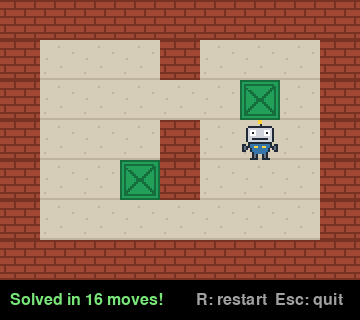
The window as text
fill (0, 0, 0)
blit wall.png at (0, 0)
blit wall.png at (40, 0)
blit wall.png at (80, 0)
blit wall.png at (120, 0)
blit wall.png at (160, 0)
blit wall.png at (200, 0)
blit wall.png at (240, 0)
blit wall.png at (280, 0)
blit wall.png at (320, 0)
blit wall.png at (0, 40)
blit floor.png at (40, 40)
blit floor.png at (80, 40)
blit floor.png at (120, 40)
blit wall.png at (160, 40)
blit floor.png at (200, 40)
blit floor.png at (240, 40)
blit floor.png at (280, 40)
blit wall.png at (320, 40)
blit wall.png at (0, 80)
blit floor.png at (40, 80)
blit floor.png at (80, 80)
blit floor.png at (120, 80)
blit floor.png at (160, 80)
blit floor.png at (200, 80)
blit target.png at (240, 80)
blit box-done.png at (240, 80)
blit floor.png at (280, 80)
blit wall.png at (320, 80)
blit wall.png at (0, 120)
blit floor.png at (40, 120)
blit floor.png at (80, 120)
blit floor.png at (120, 120)
blit wall.png at (160, 120)
blit floor.png at (200, 120)
blit floor.png at (240, 120)
blit floor.png at (280, 120)
blit wall.png at (320, 120)
blit wall.png at (0, 160)
blit floor.png at (40, 160)
blit floor.png at (80, 160)
blit target.png at (120, 160)
blit box-done.png at (120, 160)
blit wall.png at (160, 160)
blit floor.png at (200, 160)
blit floor.png at (240, 160)
blit floor.png at (280, 160)
blit wall.png at (320, 160)
blit wall.png at (0, 200)
blit floor.png at (40, 200)
blit floor.png at (80, 200)
blit floor.png at (120, 200)
blit floor.png at (160, 200)
blit floor.png at (200, 200)
blit floor.png at (240, 200)
blit floor.png at (280, 200)
blit wall.png at (320, 200)
blit wall.png at (0, 240)
blit wall.png at (40, 240)
blit wall.png at (80, 240)
blit wall.png at (120, 240)
blit wall.png at (160, 240)
blit wall.png at (200, 240)
blit wall.png at (240, 240)
blit wall.png at (280, 240)
blit wall.png at (320, 240)
blit robot.png at (240, 120)
blit text "Solved in 16 moves!" at (10, 292)
blit text "R: restart  Esc: quit" at (196, 292)