Moving the robot
The map is ready, so it's time for the robot. Along with the three tiles of the map, the game now loads its picture:

floor.png, 40 × 40 pixels
wall.png, 40 × 40 pixels
target.png, 40 × 40 pixels
robot.png, 40 × 40 pixelsWhere is the robot?
The robot moves, and the map never does. So the game keeps the robot's place in an attribute of its own, self.robot: a tuple of its column and its row. (2, 3) is the square at x = 2 and y = 3. These are squares, not pixels. Pixels are needed only for drawing, and there x * SIZE and y * SIZE give them.
The robot gets its place in a new method, reset, which __init__ calls. Everything that changes during a game is set up there, and in step 4 the game calls it again to start over.
You could also mark the robot in the map with a character of its own, and search the map for it whenever you need its place. That works, but then the map changes on every move, and every move starts with a search. Keeping the map for what never moves and the robot in an attribute keeps both simple.
Drawing the robot
The robot picture is transparent around the robot, so when it's drawn on top of a tile, the floor shows through. The order matters: whatever is drawn later covers what was drawn before. So draw draws the map first, and the robot after the loops:
robot_x, robot_y = self.robot
self.window.blit(self.robot_picture, (robot_x * SIZE, robot_y * SIZE))
One square per key press
The robot moves a whole square each time an arrow key is pressed, and a KEYDOWN event comes once for each press. (Moving a little on every frame while a key is held down suits smooth movement, but here the robot would race across 60 squares a second.) Each arrow key calls the method try_move with a direction: how much x and y change.
| Key | dx | dy |
|---|---|---|
| right | 1 | 0 |
| left | -1 | 0 |
| up | 0 | -1 |
| down | 0 | 1 |
Up is -1 because y counts from the top of the window.
Walls stop the robot
try_move works out the square the robot would step on. If it's a wall, return ends the method right there and the robot stays where it is. Otherwise the robot gets its new place:
def try_move(self, dx, dy):
    x, y = self.robot
    new_x = x + dx
    new_y = y + dy
    if self.map[new_y][new_x] == "#":
        return
    self.robot = (new_x, new_y)
Notice the order again: the map is read row first, self.map[new_y][new_x].
Why the map has walls all around
The walls around the edge keep the robot on the map. Without them, a robot in the last column that steps right would make the program read a square that isn't there:
row = "#....."
x = 5
print(row[x + 1])Traceback (most recent call last):
File "main.py", line 3, in <module>
print(row[x + 1])
~~~^^^^^^^
IndexError: string index out of rangeStepping left from column 0 is worse: row[-1] is the last square of the row, so there's no error at all, and the robot would walk out of the window. A wall around the edge means the robot never gets there.
Here's the game so far. In the page you can play it with the arrow keys:
import pygame

SIZE = 40
LEVEL = [
    "#########",
    "#...#...#",
    "#.....X.#",
    "#...#...#",
    "#..X#...#",
    "#.......#",
    "#########",
]


class BoxGame:
    def __init__(self):
        pygame.init()
        self.load_pictures()
        self.map = LEVEL
        self.height = len(self.map)
        self.width = len(self.map[0])
        self.window = pygame.display.set_mode((self.width * SIZE, self.height * SIZE))
        pygame.display.set_caption("Box Robot")
        self.clock = pygame.time.Clock()
        self.reset()

    def load_pictures(self):
        self.tiles = {
            "#": pygame.image.load("wall.png"),
            ".": pygame.image.load("floor.png"),
            "X": pygame.image.load("target.png"),
        }
        self.robot_picture = pygame.image.load("robot.png")

    def reset(self):
        self.robot = (2, 3)

    def run(self):
        while True:
            self.handle_events()
            self.draw()
            self.clock.tick(60)

    def handle_events(self):
        for event in pygame.event.get():
            if event.type == pygame.QUIT:
                exit()
            if event.type == pygame.KEYDOWN:
                if event.key == pygame.K_LEFT:
                    self.try_move(-1, 0)
                if event.key == pygame.K_RIGHT:
                    self.try_move(1, 0)
                if event.key == pygame.K_UP:
                    self.try_move(0, -1)
                if event.key == pygame.K_DOWN:
                    self.try_move(0, 1)

    def try_move(self, dx, dy):
        x, y = self.robot
        new_x = x + dx
        new_y = y + dy
        if self.map[new_y][new_x] == "#":
            return
        self.robot = (new_x, new_y)

    def draw(self):
        self.window.fill((0, 0, 0))
        for y in range(self.height):
            for x in range(self.width):
                square = self.map[y][x]
                self.window.blit(self.tiles[square], (x * SIZE, y * SIZE))
        robot_x, robot_y = self.robot
        self.window.blit(self.robot_picture, (robot_x * SIZE, robot_y * SIZE))
        pygame.display.flip()


if __name__ == "__main__":
    game = BoxGame()
    game.run()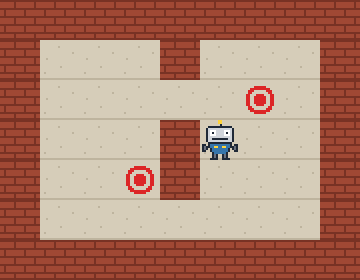
The window as text
fill (0, 0, 0)
blit wall.png at (0, 0)
blit wall.png at (40, 0)
blit wall.png at (80, 0)
blit wall.png at (120, 0)
blit wall.png at (160, 0)
blit wall.png at (200, 0)
blit wall.png at (240, 0)
blit wall.png at (280, 0)
blit wall.png at (320, 0)
blit wall.png at (0, 40)
blit floor.png at (40, 40)
blit floor.png at (80, 40)
blit floor.png at (120, 40)
blit wall.png at (160, 40)
blit floor.png at (200, 40)
blit floor.png at (240, 40)
blit floor.png at (280, 40)
blit wall.png at (320, 40)
blit wall.png at (0, 80)
blit floor.png at (40, 80)
blit floor.png at (80, 80)
blit floor.png at (120, 80)
blit floor.png at (160, 80)
blit floor.png at (200, 80)
blit target.png at (240, 80)
blit floor.png at (280, 80)
blit wall.png at (320, 80)
blit wall.png at (0, 120)
blit floor.png at (40, 120)
blit floor.png at (80, 120)
blit floor.png at (120, 120)
blit wall.png at (160, 120)
blit floor.png at (200, 120)
blit floor.png at (240, 120)
blit floor.png at (280, 120)
blit wall.png at (320, 120)
blit wall.png at (0, 160)
blit floor.png at (40, 160)
blit floor.png at (80, 160)
blit target.png at (120, 160)
blit wall.png at (160, 160)
blit floor.png at (200, 160)
blit floor.png at (240, 160)
blit floor.png at (280, 160)
blit wall.png at (320, 160)
blit wall.png at (0, 200)
blit floor.png at (40, 200)
blit floor.png at (80, 200)
blit floor.png at (120, 200)
blit floor.png at (160, 200)
blit floor.png at (200, 200)
blit floor.png at (240, 200)
blit floor.png at (280, 200)
blit wall.png at (320, 200)
blit wall.png at (0, 240)
blit wall.png at (40, 240)
blit wall.png at (80, 240)
blit wall.png at (120, 240)
blit wall.png at (160, 240)
blit wall.png at (200, 240)
blit wall.png at (240, 240)
blit wall.png at (280, 240)
blit wall.png at (320, 240)
blit robot.png at (200, 120)